


What you can expect from this article
It is only through a Process modelling This makes a company’s activities and processes transparent, allowing them to be optimised. The graphical specification language is particularly well suited to this purpose Business Process Model and Notation, BPMN for short. On the programme „hsp live at 11“, hsp Managing Director Paul Liese and Torsten Busse-Stein, Managing Director of the WEFORM Consulting GmbH, on process documentation and process visualisation.
Torsten leads the ‘Process Modelling’ e-learning module within the digitalisation consultancy section of the ‘Digitalisation Consultant’ further education course, available in the HSP Community. He studied, amongst other things, accounting, management accounting and logistics, and subsequently found himself working as a commercial manager, where he relatively quickly became involved in the areas of accounting and digital invoicing. As a next step, he immersed himself in the BPMN modelling language.
What exactly is BPMN 2.0?
BPMN stands for Business Process Model and Notation. It is a universal specification language, which means that work can be easily outsourced to international specialists across language barriers. BPMN is heavily based on a graphical interface and is therefore very intuitive. The added value of specific processes can be demonstrated to the client immediately.
In version 2.0 of BPMN, the graphical representations have been further optimised. It is possible to examine various processes in detail and analyse them. A particular strength of the tool lies in its ability to produce documentation of exceptional depth. In the e-learning module of the In the ‘Digitalisation Consultant’ further training course, Torsten Busse-Stein explores the topic of BPMN in detail and in a practical manner.
Who should use this?
Whether large or small, whether a taxi company or a major corporation, BPMN can be used to map out and optimise the processes of a wide variety of organisations. Whilst the processes themselves may differ, at the end of the day every process can be visualised and made accessible anywhere. Initiating change and creating momentum is not a question of the size of the organisation.
For example, every company deals with finance and accountancy. The only differences lie in the size of the inbox. However, despite all these similarities, one thing should not be overlooked: none of the projects follows a set blueprint; each one requires individual ideas and solutions.
BPMN in practice
It all starts with the current process. When a consultant like Torsten comes on board, the whole process gains momentum. Torsten points out that he does not tell any company what to do. Instead, he recommends process optimisations. That said, he always begins by facilitating a discussion, followed by an in-depth analysis.
A target concept is developed based on the current situation. Torsten then gives his clients time to familiarise themselves with BPMN and come up with their own ideas for optimisation. According to Torsten, his work has led some companies to appoint process managers to drive these optimisations forward.
Paul and Torsten agree that an existing visualisation of a company’s processes, subject to an annual review, significantly speeds up and simplifies version management. Instead of documenting everything from scratch, only the updates need to be incorporated. One method of assigning responsibility could be to assign a swimlane (visualisation in BPMN) to a person.
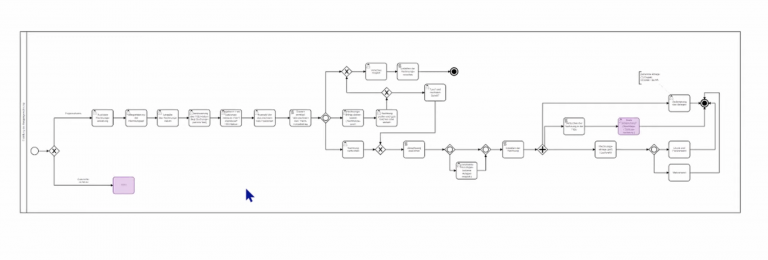
The BPMN process model can be easily imported into Opti.Tax and populated with detailed information. This allows tasks and other parameters to be added to individual process steps, which can then be supplemented with descriptions, information and lists in as much detail as required.
The topic of BPMN is explored in greater depth in the e-learning module ‘Process Modelling in Digitalisation Consultancy’ as part of the ‘Digitalisation Consultant’ continuing professional development course at the hsp Academy. In individual chapters, Torsten explains how to facilitate and structure a modelling session and how the programme itself works.







 German
  English