


The XBRL.App enables projects in the Taxonomy software Opti.Tax to be edited on the move. The mobile exchange of information between the preparer and the client also includes an approval and authorisation process within the meaning of Section 87d(3) of the German Fiscal Code (AO), as amended.
The creators may be tax advisers, auditors, solicitors or the company itself; they may wish to submit the data they have recorded to the client or a line manager for approval before submitting or finalising the project or report, or to document the outcomes of meetings in a sustainable yet mobile manner directly within the project.
Sustainable and mobile
With the Taxonomy software Opti.Tax Accounting-related taxonomies are visualised and made easy for users to enter through subject-matter-based input aids and detailed views; the data can then be transmitted electronically to various recipients via integrated interfaces in accordance with the XBRL standard.
With the multi-client Taxonomy software The following projects, amongst others, are being carried out:
- E-balance sheet,
- Federal Gazette,
- Documentation (reporting for data protection or procedural documentation)
As part of the Tax Control System (TCS), tasks for various purposes and recipients can be recorded in projects and assigned deadlines. Comprehensive reports generated in real time track the progress of the work.
The XBRL.App enables projects in the Opti.Tax taxonomy software to edit on the iPad whilst on the move. The exchange of information between the preparer and the client via mobile devices also involves an approval and authorisation process within the meaning of Section 87d(3) of the German Fiscal Code (AO), as amended.
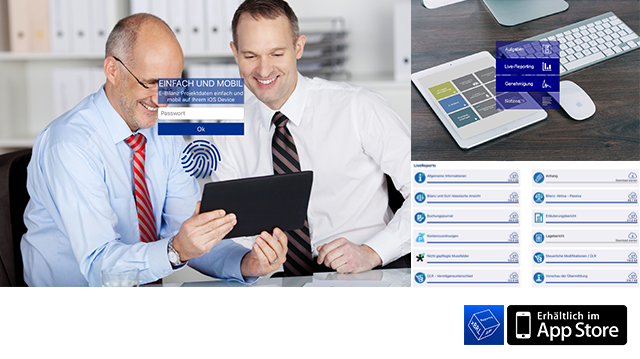
The XBRL.App imports the taxonomy data according to selected clients and projects, taking user permissions into account. The project data is presented in clear PDFs and can be annotated directly with comments and handwritten additions using the „Apple Pencil“ function.
The project can therefore be worked on whilst on the move, or the data can be submitted to a third party for approval. It is also possible, however, to submit only selected reports for review, without the person being given full access to all the data recorded.
Working productively on the move
The project data is signed off on the iPad by the client and assigned a unique authorisation code; at the same time, the project status changes to „approved for dispatch“. As soon as the XBRL.App Once it can be synchronised with the taxonomy software again, the projects will be updated with the approval status, the project status and the edited and annotated PDFs, thereby updating the relevant data records.
Mobile processing saves time and boosts efficiency by transmitting documents exclusively via electronic channels. Data protection is not overlooked in the process: When Apple’s data protection features (iOS, WatchKit Extension, tvOS) are enabled, the integrated encryption hardware is used to store files in an encrypted format within the app’s container on the hard drive. Access to the data is granted via Touch ID and fingerprint authentication. The standard protection level provides comprehensive security, ensuring that files are encrypted and inaccessible whilst the device is locked. If a different user logs in on the iPad or if the password is entered incorrectly, the project data is permanently deleted.
The XBRL.App supports mobile communication and the paperless office.







 German
  English